Anthropic Transforms Claude into Autonomous Workflow Engine: How Developer Workflows Will Be Restructured
In May 2026, Anthropic transformed Claude into an 'Autonomous Workflow Engine' — Agents can visualize the entire execution plan before acting. Claude Code gains new agent control flags; Opus 4.7 becomes the default model. This article analyzes the practical impact on developer workflows.
Note: Facts sourced from Anthropic official announcements and Ars Technica / MSN reporting, May 2026. No undisclosed information.
1. Anthropic’s Strategic Transformation
May 2026: Anthropic made a major strategic shift to the Claude product line:
Goal: Upgrade from “conversational AI” to “Autonomous Workflow Engine”
This means Claude is no longer just an “answering assistant” — it can now:
- Understand complex tasks → Decompose into multiple steps
- Simulate before execute → Visualize entire execution plan before acting
- Autonomous execution → Execute tasks according to plan
- Real-time feedback → Continuously report progress and accept adjustments
Claude Code simultaneously received a major update with new agent control features; Opus 4.7 officially became the default model.
2. Core Feature Analysis
1. Simulate Before Execute Mode
This is the most critical new feature. Before executing, the Agent shows its complete execution plan, allowing users to:
- Review the plan: See exactly which files will be modified, which commands run
- Adjust parameters: Modify prompts or add constraints before execution
- Cancel/approve: Let the Agent proceed only after confirmation
Traditional workflow:
User → Send instruction → AI executes (no mid-course intervention)

New workflow:
User → Send instruction → AI shows execution plan → User approves → AI executes
                              ↑
                      Adjustable, cancellable
Technical implementation:
# Claude Code Simulate-Before-Execute API (pseudocode)
result = await claude.messages.create(
    model="claude-opus-4.7",
    messages=[{"role": "user", "content": "Refactor the auth module"}],
    # Enable simulate-before-execute mode
    workflow={
        "mode": "simulate_before_execute",
        "display_plan": True,      # Show execution plan
        "user_approval_required": True,  # Require user approval
        "allow_plan_edit": True,    # Allow user to edit plan before execution
    }
)

# Returned plan structure
# {
#   "steps": [
#     {"action": "read", "target": "auth/middleware.ts"},
#     {"action": "modify", "target": "auth/token.ts", "change": "add_async_refresh"},
#     {"action": "test", "command": "npm run test auth"},
#   ],
#   "risk_level": "medium",
#   "estimated_time": "45s"
# }
2. Claude Code Agent Control Flags Update
Claude Code introduced multiple new control flags for fine-grained Agent behavior management:
| Flag | Purpose | Default |
|---|---|---|
--agent-mode | Select agent behavior mode (auto/agentic/approval) | auto |
--max-steps | Max execution steps, prevent infinite loops | 50 |
--plan-only | Show plan only, don’t execute | false |
--confirm-destructive | Require confirmation before delete/overwrite | true |
--claude-flag | Show current Claude model in use | Opus 4.7 |
# Enable simulate-before-execute mode
claude --agent-mode simulate_before_execute

# Show plan only (no execution)
claude --plan-only

# Confirm high-risk operations
claude --confirm-destructive true --max-steps 20

# Specify Opus 4.7 explicitly
claude --claude-model opus-4.7
3. Opus 4.7 as Default
Claude Code now defaults to Opus 4.7 as the inference model:
- Coding capability: Terminal Bench 96% (vs 54.5% for previous gen)
- Reliability: Fewer abandons, fewer tool errors
- Multimodal: 2,576px image understanding (was 860px)
# Check Claude Code version and default model
claude --version
# Claude Code v2.4 (Claude Opus 4.7 default)

# Switch to another model
claude --claude-model sonnet-4.6
3. Agent Loop Mechanism Deep Dive
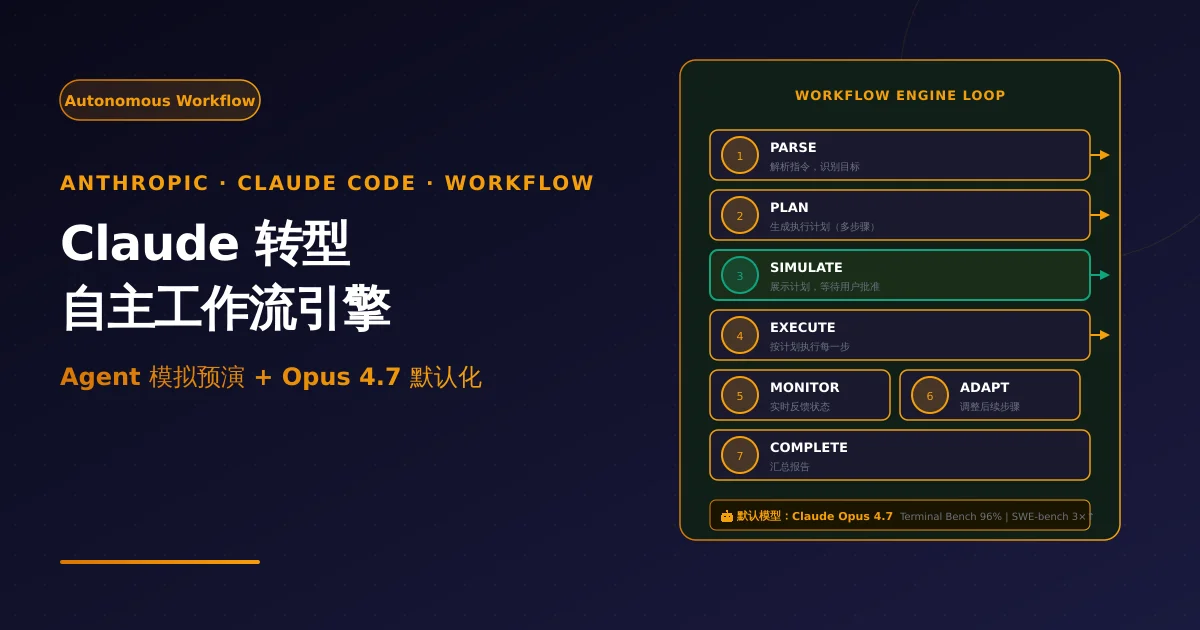
Workflow Engine Core Loop
Claude’s workflow engine is based on an enhanced Agent Loop:
┌─────────────────────────────────────────────┐
│           WORKFLOW ENGINE LOOP               │
├─────────────────────────────────────────────┤
│  1. PARSE   →  Parse user instruction, identify goals  │
│  2. PLAN    →  Generate execution plan (multi-step)    │
│  3. SIMULATE→  Display plan, await user approval      │
│  4. EXECUTE →  Execute each step per plan           │
│  5. MONITOR →  Real-time execution status feedback   │
│  6. ADAPT   →  Adjust subsequent steps per feedback │
│  7. COMPLETE→  Summarize report after completion      │
└─────────────────────────────────────────────┘
MCP Tool Integration
Claude Code now supports connecting more tools via MCP (Model Context Protocol):
// MCP tool connection configuration
const mcpConfig = {
  tools: [
    // GitHub connection
    { name: 'github', endpoint: 'http://localhost:3000/github',
      capabilities: ['repo_read', 'issue_create', 'pr_review'] },
    // Database connection
    { name: 'postgres', endpoint: 'http://localhost:3000/postgres',
      capabilities: ['query', 'migrate'] },
    // Filesystem (sandboxed)
    { name: 'filesystem', endpoint: 'http://localhost:3000/fs',
      capabilities: ['read', 'write', 'delete'], sandbox: true },
  ],
  // Auto-check permissions before tool invocation
  autoPermissionCheck: true,
};

// Tool invocation in Claude Code
// > "Review this PR's code changes and log the review result in the database"
// → Agent automatically calls github MCP to read PR diff
// → Agent automatically calls postgres MCP to write review result
4. Practical Impact on Developer Workflows
Scenarios with Efficiency Gains
| Scenario | Before | After | Improvement |
|---|---|---|---|
| Large module refactoring | Send instruction, wait, no mid-course intervention | Preview plan, approve, adjust mid-course | Fewer reworks, lower risk |
| Cross-service migration | Must describe each step precisely | AI decomposes steps, confirms one by one | Fewer omissions |
| Modifying unfamiliar codebase | Afraid to touch due to error risk | AI analyzes plan, executes after approval | Lower psychological barrier |
| CI/CD integration | Manually write deployment scripts | AI auto-generates and executes plan | Time savings |
New Workflow Example
Scenario: Refactor auth module (JWT → OAuth2)
Developer:
"Help me refactor the auth module from JWT to OAuth2, and update related tests"

Claude (Simulate mode):
📋 Execution Plan Preview:
1. Read current auth/ directory structure (3 files)
2. Modify auth/token.ts: JWT → OAuth2 logic
3. Create auth/oauth2.ts: OAuth2 wrapper
4. Modify auth/middleware.ts: integrate new token verification
5. Update auth.test.ts: add OAuth2 test cases
6. Run tests to verify

⚠️ Risk Warning:
- Will modify 5 files
- Involves auth logic change; backup recommended

[Confirm Execute]  [Edit Plan]  [Cancel]

Developer selects "Edit Plan":
"In step 5, only add 1 integration test file instead of modifying existing tests"

Claude regenerates plan → Developer approves → Execution begins
5. NixAPI Integration Value
Claude workflow engine value for NixAPI:
// NixAPI × Claude Workflow Engine
import { NixAPI } from '@nixapi/client';

const client = new NixAPI({
  apiKey: process.env.NIXAPI_KEY,
});

// Claude workflow task routing
async function workflowTask(task: {
  type: 'refactor' | 'migrate' | 'review';
  complexity: 'low' | 'medium' | 'high';
}) {
  // Opus 4.7 is the best carrier for workflow engine
  return client.chat({
    model: 'claude-opus-4.7',
    messages: task.messages,
    // Workflow-related parameters
    workflow: {
      mode: 'simulate_before_execute',
      autoPermissionCheck: true,
    },
  });
}

// NixAPI provides:
// - Claude Opus 4.7 stable access (workflow engine default model)
// - Multi-model routing (simple tasks auto-downgrade, cost savings)
// - Unified logging (all workflow tasks auditable)
6. Key Takeaways
| Dimension | Assessment |
|---|---|
| Strategic significance | Anthropic upgrading Claude from “answerer” to “executor” — clear Agentic direction |
| Product maturity | Simulate feature live; stability good |
| Developer value | High-risk tasks (refactor/migrate) see significant improvement; lower error cost |
| Security design | Approval mechanism + sandbox isolation; high production readiness |
| Ecosystem expansion | MCP tool ecosystem growing; workflow capabilities will strengthen |
Claude Workflow Engine represents AI coding tools evolving from “you say, I do” to “you review, I execute” model. For NixAPI users, Claude Opus 4.7 as default model means complex tasks have a more powerful handler — and NixAPI’s multi-model routing allows auto-downgrade for simple scenarios, balancing efficiency and cost.
Try NixAPI Now
Reliable LLM API relay for OpenAI, Claude, Gemini, DeepSeek, Qwen, and Grok with ¥1 = $1 top-up
Sign Up Free