The MCP Protocol Rush: AI Tool Interconnect Standardization War
Anthropic's open-source MCP (Model Context Protocol) is becoming the USB-C of AI — solving the fragmentation problem where AI agents couldn't uniformly call external tools. StackAdapt, Anthropic, OpenAI, and Google are accelerating MCP ecosystem expansion. This article analyzes MCP's core technical design, current ecosystem status, and what it means for API aggregation platforms.
Note: Facts sourced from Anthropic’s official Model Context Protocol page (modelcontextprotocol.io), GitHub MCP Servers repository, and TechCrunch reporting. No undisclosed information.
1. Why MCP Was Needed
The Pre-MCP Tool Fragmentation Problem
Before MCP, integrating AI models with external tools was painfully ad-hoc:
| Integration | Traditional Approach | Maintenance Cost |
|---|---|---|
| Connect AI to GitHub | Write a custom GitHub API wrapper | Each tool needs its own implementation — no reuse |
| Connect AI to PostgreSQL | Write a SQL tool | Data source changes → rewrite everything |
| Connect AI to Google Drive | Write OAuth + API integration | Reinvent the wheel, security risks high |
Root problem: Every data source needed a separate custom implementation — impossible to scale.
MCP’s Core Design Thesis
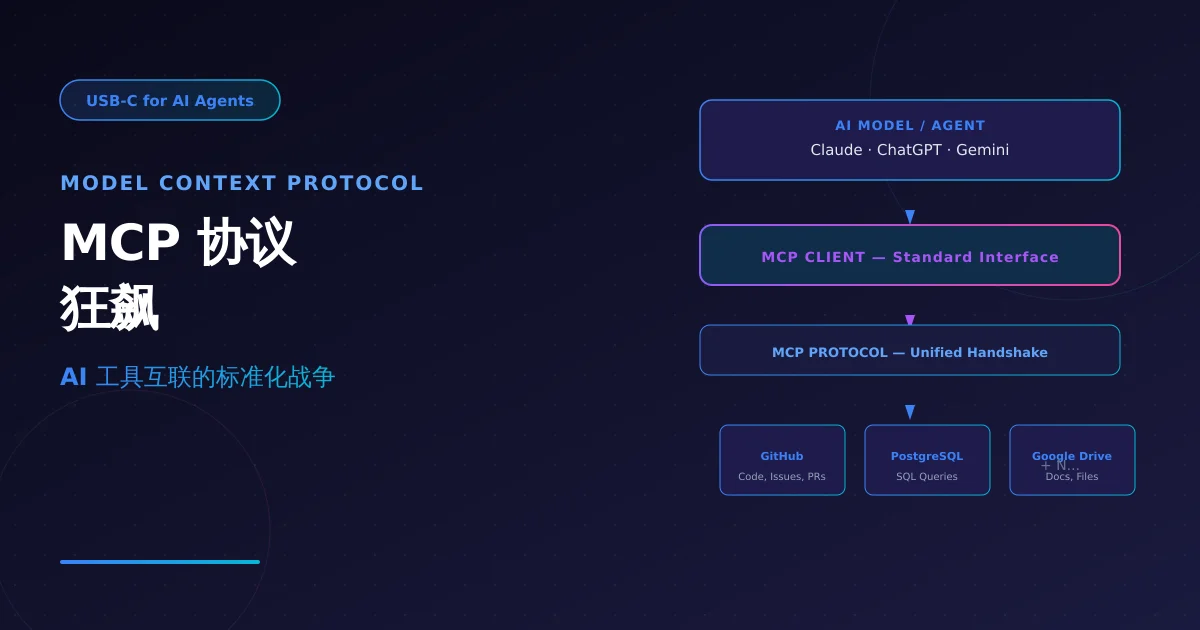
MCP = USB-C for AI
Just as USB-C replaced the chaos of mini-USB, micro-USB, and Lightning with one standard connector, MCP replaces the chaos of “each data source requires a separate integration” with one open standard.
┌─────────────────────────────────────────────────────┐
│                   AI Model / Agent                   │
│              (Claude, ChatGPT, etc.)                 │
└─────────────────────┬───────────────────────────────┘
                      │  MCP Client
                      │  (Standard interface — implementation-agnostic)
┌─────────────────────┴───────────────────────────────┐
│                   MCP Protocol                       │
│           (Unified handshake + tool description)      │
└─────────────────────┬───────────────────────────────┘
                      │
        ┌─────────────┼─────────────┐
        ↓             ↓             ↓
   ┌─────────┐   ┌─────────┐   ┌─────────┐
   │ GitHub  │   │ Postgres│   │ Google  │
   │ Server  │   │ Server  │   │ Drive   │
   └─────────┘   └─────────┘   └─────────┘
   MCP Server    MCP Server    MCP Server
Key properties:
- Open standard: Anyone can implement — no vendor lock-in
- Bidirectional: Tool results flow back into model context
- Secure isolation: MCP Servers can run locally; models have no direct system access
2. MCP Protocol Architecture
Core Components
MCP has three core components:
| Component | Role | Description |
|---|---|---|
| MCP Host | AI Application | The AI model or Agent wanting tool access (e.g., Claude Desktop) |
| MCP Client | Protocol Client | Runs inside the Host, communicates with MCP Servers |
| MCP Server | Tool Adapter | Exposes specific data sources/tools via standard MCP interface |
Tool Description Format
MCP defines a standardized tool description language — AI models use it to understand “what this tool can do”:
// Tool manifest exposed by an MCP Server
{
  "tools": [
    {
      "name": "github_search_repos",
      "description": "Search GitHub repositories with keyword + language filters",
      "inputSchema": {
        "type": "object",
        "properties": {
          "query": { "type": "string", "description": "Search query" },
          "language": { "type": "string", "description": "Programming language, e.g. python" }
        },
        "required": ["query"]
      }
    },
    {
      "name": "postgres_query",
      "description": "Execute read-only SQL queries",
      "inputSchema": {
        "type": "object",
        "properties": {
          "sql": { "type": "string" }
        }
      }
    }
  ]
}
The AI model sees this manifest and autonomously decides when to call which tool — no manual workflow pre-definition needed.
Local Secure Execution
MCP Servers can run locally (localhost). All tool invocations flow through the MCP Client as a proxy:
AI Model → [MCP Client] → [MCP Server (localhost)] → External System
                     ↑
              No direct network access
The AI cannot directly “break out” to access your database — all operations must go through tools defined by the MCP Server, providing natural security isolation.
3. Ecosystem Status: Who’s Using MCP
Official Support
- Anthropic: Claude Desktop has built-in MCP Client; supports local MCP Server connections
- OpenAI: ChatGPT supports MCP for external tool integration
- Google: Gemini accesses data sources through the MCP ecosystem
Pre-built MCP Servers (Official Repository)
Anthropic open-sourced reference implementations at modelcontextprotocol/servers:
| MCP Server | Capabilities |
|---|---|
| GitHub | Search repos, read files, create Issues/PRs |
| Google Drive | Search docs, read file contents |
| Slack | Send messages, search channel history |
| PostgreSQL | Execute read-only SQL queries |
| Puppeteer | Browser automation control |
| Filesystem | Local file read/write (sandboxed) |
Enterprise Adoption Cases
| Company | Integration | Use Case |
|---|---|---|
| Block (Square) | MCP to internal databases | Customer service Agent with real-time account data |
| Apollo | MCP to sales data | AI sales assistant analyzing customer data |
| StackAdapt | MCP Server fully available | Advertising platform AI assistant accessing internal data |
| Coder | MCP to development environment | Enterprise self-hosted AI coding Agent |
4. Practical Value for AI Developers
From “Hand-coded Integration” to “Plug-and-Play”
Traditional approach (separate code per data source):
Claude → Write GitHub wrapper → Write Postgres wrapper → Write Slack wrapper
       ↓                    ↓                    ↓
     1+ week               3+ days              2+ days
MCP approach (standard protocol, reusable):
Claude (built-in MCP Client)
     ↓
  Find MCP Server → Plug in → Use
     ↓
   5 minutes to configure all tools
Developer Quickstart
// 1. Configure MCP Server in Claude Desktop
// Path: Settings → Developer → Edit Config

// claude_desktop_config.json
{
  "mcpServers": {
    "github": {
      "command": "npx",
      "args": ["-y", "@modelcontextprotocol/server-github"],
      "env": {
        "GITHUB_PERSONAL_ACCESS_TOKEN": "your-token"
      }
    },
    "postgres": {
      "command": "npx",
      "args": ["-y", "@modelcontextprotocol/server-postgres"],
      "env": {
        "DATABASE_URL": "postgres://user:pass@localhost/db"
      }
    }
  }
}

// 2. Start using it — Claude auto-discovers available tools
// Just say: "Find the most starred NixAPI-related repos on GitHub from the past week"
5. NixAPI MCP Integration Value
For NixAPI multi-model aggregation platform, MCP means:
// NixAPI × MCP: Multi-model + unified tool calling
import { NixAPI } from '@nixapi/client';
import { createMCPClient } from '@nixapi/mcp';

// One config, all tools connected
const client = createMCPClient({
  apiKey: process.env.NIXAPI_KEY,
  servers: [
    { name: 'github', endpoint: 'http://localhost:3000/github' },
    { name: 'postgres', endpoint: 'http://localhost:3000/postgres' },
    { name: 'filesystem', endpoint: 'http://localhost:3000/filesystem' },
  ],
});

// Use any model with unified tool interface
const result = await client.chat({
  model: 'claude-3-5-sonnet',
  messages: [
    { role: 'user', content: 'Analyze our user growth trend from the past 30 days in the database' }
  ],
  // Model auto-decides to use postgres MCP Server
  mcpEnabled: true,
});
Core value:
- NixAPI users don’t deal with underlying tool integration complexity
- Different models (Claude/GPT/Gemini) use the same tool-calling interface
- Tool ecosystem is infinitely extensible — no cap on MCP Server count
6. Key Takeaways
| Dimension | Assessment |
|---|---|
| Protocol maturity | Official spec + mainstream vendor backing (Anthropic/OpenAI/Google) |
| Ecosystem breadth | Pre-built servers for major tools (GitHub/DB/Slack/files); community growing |
| Developer adoption | MCP Registry live; npm package ecosystem forming |
| NixAPI value | Unifies tool layer, upgrading from “model routing” to “Agent capability platform” |
MCP isn’t hype — it’s the necessary infrastructure for AI to evolve from “single-model conversations” to “multi-tool collaboration.” NixAPI developers should monitor MCP SDK developments and evaluate including it in the next roadmap iteration.
Try NixAPI Now
Reliable LLM API relay for OpenAI, Claude, Gemini, DeepSeek, Qwen, and Grok with ¥1 = $1 top-up
Sign Up Free