OpenAI Codex Lands on iPhone: How Developers Remotely Control AI Coding Assistants from Mobile
OpenAI brings Codex coding agent to ChatGPT iOS preview, supporting remote Mac connections, operation approval, and code diff/test results viewed from phone. Windows secure sandbox also launches. Deep dive into mobile AI coding architecture and developer workflow implications.
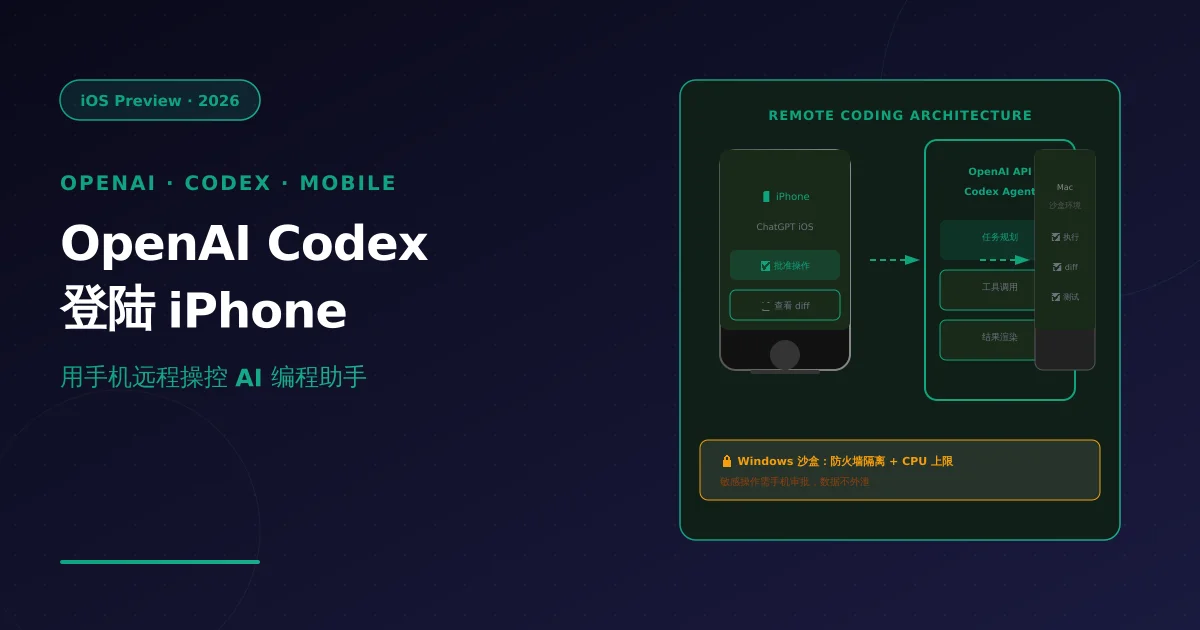
Note: Facts sourced from OpenAI official announcement (openai.com) and Forbes reporting, May 2026. No undisclosed information.
1. What Happened
This week (May 2026), OpenAI brought Codex — its coding agent product — to the ChatGPT iOS app as a preview. This is the first major deployment of AI coding tools on mobile.
Core capabilities:
| Feature | Description |
|---|---|
| Remote Mac connection | iPhone developers connect to Macs on the same network to run code, approve operations |
| Operation approval | Agent requires user confirmation on sensitive actions (delete files, deploy services) |
| Real-time feedback | View code diffs, test results, screenshots directly on phone |
| Multi-host switching | Manage multiple development hosts from one device |
The simultaneous Windows secure sandbox launch strengthens firewall isolation — ensuring AI Agent operations run in an isolated environment without affecting real development systems.
2. Technical Architecture
Overall Architecture
┌──────────────────┐      ┌──────────────────┐      ┌──────────────────┐
│   iPhone / iPad  │      │     OpenAI API    │      │   Mac/PC (Host)   │
│   ChatGPT iOS    │ ←→   │   (Codex Agent)   │ ←→   │   Secure Sandbox  │
│                  │      │                   │      │                  │
│  • View diffs    │      │  • Task planning   │      │  • Code execution │
│  • Approve ops   │      │  • Tool calling     │      │  • Terminal ops   │
│  • Switch hosts  │      │  • Result rendering│      │  • Test running   │
└──────────────────┘      └──────────────────┘      └──────────────────┘
        ↑                                                    ↑
   User approval                                           Agent execution
   Real-time feedback                                     Sandboxed isolation
Core Interaction Flow
1. Developer describes task on iPhone
   "Refactor this API to async, then run tests"

2. Codex analyzes → generates execution plan
   → Shows which files will be modified, which commands run

3. User approves critical operations on phone
   (e.g., modify 5 files, delete 1 directory)

4. Agent executes on remote Mac
   → Real-time diff/test results pushed back to phone

5. Developer views results on phone
   → Screenshots, output, test pass/fail status
Security Sandbox Isolation Design
Windows sandbox key design:
# Pseudocode: sandbox isolation logic
class SecureSandbox:
    def __init__(self, host_config):
        self.firewall_rules = [
            "block_outbound_ssh_port_22",    # Block SSH outbound
            "block_database_write_ports",     # Block DB writes
            "block_npm_publish_lifecycle",    # Block npm publish
        ]

        self.resource_limits = {
            "cpu_percent": 80,      # Max 80% CPU
            "memory_gb": 4,         # Max 4GB RAM
            "disk_write_gb": 1,    # Max 1GB disk write
        }

    def execute(self, command: str) -> ExecutionResult:
        # Pre-execution check
        if not self.approve_required(command):
            return PendingApproval(user_confirm=True)

        # Execute in isolated environment
        return self.isolated_container.run(command)
Isolation layers:
- Network: Firewall rules block sensitive ports
- Filesystem: Operations restricted to project directory only
- Resource: CPU/memory/disk write caps enforced
- Approval: High-risk operations (delete, deploy) require explicit user confirmation
3. Practical Developer Impact
Who Benefits
| Scenario | Benefit |
|---|---|
| On-the-go code review | View AI code changes on phone |
| Emergency hotfixes | Approve AI-executed fixes without laptop |
| Cross-device collaboration | Team members approve same task from各自设备 |
| CI/CD monitoring | Real-time build/test status pushed to phone |
Current Limitations
| Limitation | Description |
|---|---|
| Mac required | Remote host must be macOS with ChatGPT desktop installed |
| iOS preview only | Android not yet supported; stability unverified |
| Approval latency | Network delay may cause operation wait times |
| Security boundary | Sandbox isolation not yet tested at production scale |
4. NixAPI Integration Value
For NixAPI multi-model API platform, Codex mobile means new scenarios:
// NixAPI × Codex mobile: multi-model + remote collaboration
import { NixAPI } from '@nixapi/client';

const client = new NixAPI({
  apiKey: process.env.NIXAPI_KEY,
  // Codex via NixAPI routing — leverage multi-model optimization
  routingStrategy: 'intent-aware',
});

// Mobile request scenario
async function mobileCodingRequest(task: string) {
  // Simple query → low-latency model
  if (task.type === 'explain') {
    return client.chat({ model: 'gpt-5.5-instant', messages: task.messages });
  }

  // Complex coding task → Codex / Claude
  if (task.type === 'code') {
    return client.chat({ model: 'claude-opus-4.6', messages: task.messages });
  }
}

// NixAPI provides mobile developers with:
// - Multi-model routing (one API for all coding capabilities)
// - Cost optimization (simple tasks auto-downgraded to lightweight models)
// - Unified logging (all device requests unified audit)
5. How to Get Started
iOS Setup Steps
1. Ensure iPhone and Mac are on same Wi-Fi network

2. Install ChatGPT desktop (v6.0+) on Mac
   → Enable "Remote Connection" option

3. On iPhone: Open ChatGPT → Settings → Codex
   → Scan pairing QR code on Mac

4. Start using:
   "Review the PR submitted last week"
   "What's the fix for this bug"
Windows Sandbox Configuration
# Windows sandbox launch command
chatgpt --sandbox --firewall-strict --max-cpu 80 --max-memory 4GB

# Verify sandbox status
chatgpt --sandbox-status
# Output: Active | Isolated | CPU: 45% | Memory: 2.1GB
6. Key Takeaways
| Dimension | Assessment |
|---|---|
| Product maturity | Preview — feature complete but stability unverified |
| Scenario value | Practical supplement for mobile work, not a desktop replacement |
| Security design | Sandbox + approval dual mechanism; production readiness TBD |
| Ecosystem expansion | Android support expected Q3; API-ization is next step |
| NixAPI relevance | Multi-model routing covers Codex-class tasks; collaboration value > competition |
OpenAI moving coding Agents to mobile is a significant step in AI tools evolving from “desktop-exclusive” to “anytime, anywhere.” Despite current limitations, it represents the future direction of AI-assisted development: your phone will become the remote control for your AI coding assistant.
Try NixAPI Now
Reliable LLM API relay for OpenAI, Claude, Gemini, DeepSeek, Qwen, and Grok with ¥1 = $1 top-up
Sign Up Free